How We Built Our Multimodal Agent Harness
Adding images and live camera to a real-time voice loop is a systems problem, and how you solve it decides whether the agent stays reliable or starts to stutter. Here is the engineering behind it, and why it matters.
You can build a live multimodal agent by running a separate pipeline for each modality: one for voice, one for image, one for video, one for text, joined together at the end. That approach works, and plenty of systems are built this way. It is also inefficient. Every modality you add on its own path adds a hop of latency, and keeping the state and timing of those paths in sync becomes its own problem. The modalities drift, and the agent feels it.
We think unifying the pipeline is step one of building a multimodal AI agent. One path that carries voice, image, and video means the agent reasons over everything on a single pipeline, with one place to manage latency and state. This blog is about how we are building that into the DinoDial harness, starting with sight.
The goal is simple to state. We want to build an agent harness where the agent is able to also see while it talks. Show it a photo and ask about it in the same breath. Hold a phone up to a piece of equipment and have it watch and respond as you move. Most of the difficulty in that is in the pipeline, not the model.
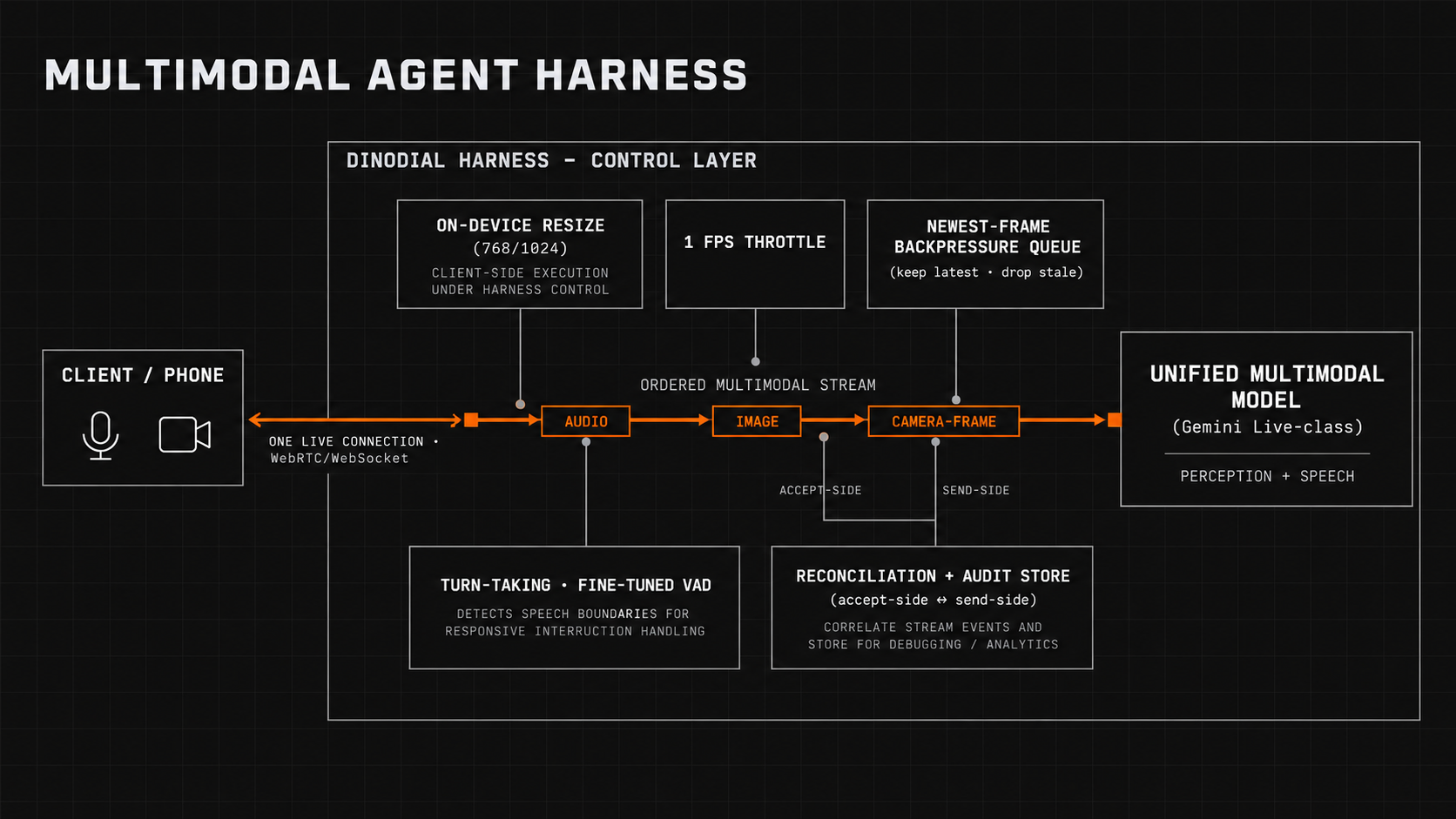
- You can build a multimodal agent as a separate pipeline per modality, but every added path brings its own latency and its own state to keep in sync. Unifying the pipeline removes both, and it is where we started.
- Sight rides the same live connection as the voice, so the agent reasons about what it sees and what it hears in a single turn, instead of waiting on a second pipeline to answer.
- Camera frames are resized on the device to fixed presets before they are sent, so a heavy image can never crowd the audio off the line.
- The camera runs at one frame per second. That is enough to follow a fault someone is showing the agent, and it leaves the real-time voice its bandwidth.
- When frames arrive faster than they can be sent, the harness keeps the newest one and drops the rest, so the view stays current and the voice never stalls.
- Every frame the agent accepts is recorded and every send is logged, so you can review exactly what it saw when it answered.
Why is voice the hardest pipeline to make multimodal?
A voice agent is a real-time loop. Audio streams up to the model over one open connection, audio streams back, and the exchange runs tight enough that a caller can cut in mid-sentence and the agent stops, listens, and responds. Holding that timing is the whole job. It is the hardest pipeline to build, and it is the one we wanted to add modalities to without breaking the flow of the conversation.
Sight has to happen inside that loop. There is one live conversation in flight, and the model has to reason about the picture and the speech in the same turn. Let's look at what changes when you run a single pipeline instead of separate ones, so the table below makes sense.
| Concern | Separate pipelines per modality | One unified pipeline |
|---|---|---|
| Latency | One hop added per modality | Everything on the live path |
| State and timing | Kept in sync across paths that drift | One pipeline, one source of truth |
| Connections to run | One to authenticate and reconnect per path | One to authenticate and reconnect |
| Failure surface | Any path can be down while another is up | Contained in one place |
How do we put images on a live voice agent's stream?
Three decisions carry most of the weight.
One connection
Everything runs on the connection that already exists. Audio, still images, and camera frames share one ordered stream, tagged so the receiver can tell them apart. There is one connection to authenticate and one to reconnect, and one pipeline that tells the model what it knew when it answered.
Shrink the frame before it hits the wire
A raw camera frame is several megabytes. Sending that into a socket that is already carrying live audio will stall the voice. So the frame is resized on the device, before anything is sent, down to one of two fixed presets: roughly 768 or 1024 pixels on the long edge, aspect ratio kept, and no upscaling. Camera frames are compressed; deliberate snapshots stay lossless so a serial number or a label stays readable. The model gets enough pixels to read what matters, and the payload stays light enough to leave the voice its bandwidth. How many pixels count as enough is a product decision. More resolution costs more and spends more time on the wire for detail the model often does not use.
One frame per second
A live camera runs at thirty frames a second. Streaming that into a voice call would swamp the audio and run up cost for little gain in understanding. So the camera is capped at one frame per second. For the job these agents do, someone holding a phone up to a machine and walking the agent through a fault, one frame a second captures the situation and leaves the pipeline room to breathe. When a case needs more, a fast blinking indicator or quick motion, a deliberate high-resolution snapshot handles it better than a faster stream.
What happens when frames arrive faster than they can be sent?
Images are large and they arrive in bursts. If they queue up behind the audio, one slow frame stalls the voice and the agent goes quiet mid-sentence. One of the rules our multimodal agent harness follows is that visuals never delay the audio.
When frames arrive faster than the pipeline can send them, it holds the newest frame and drops the rest. A camera frame that a newer frame has already replaced no longer describes the current view, so keeping it would only push the live picture back and hold the line against the voice. Dropping it keeps both the voice and the view current.
A photo the caller took on purpose is handled differently from a passing camera frame. A deliberate snapshot is a specific request, so the pipeline holds it until it can send it rather than letting the next camera frame overwrite it.
Visuals never delay the audio. When the view and the voice compete for the line, the voice wins and the picture catches up.
Can you review what the agent actually saw?
When the agent answers a question about an image, a risk or procurement team will ask what it was looking at. Not what the caller held up, but what reached the model. Those can differ, because frames get dropped, replaced, or fail to send.
The pipeline records both halves and reconciles them. One side keeps every frame the moment it is accepted, with the original bytes and a timestamp. The other side records what happened when that frame was sent to the model: delivered, failed, replaced, or dropped at the end of the call. Afterwards the two are joined into a per-frame record of what the agent was shown and which frames reached the model when it spoke. Camera sessions are rebuilt into playable video against the conversation timeline, and a gap where frames were dropped shows as a gap rather than being smoothed away. The exact originals stay available, including the frames that never arrived.
This is the same discipline the harness applies to tool calls in our regulated deployments, and it is why we built Lens to make every call inspectable. The moment an agent acts on what it perceived is the moment worth making inspectable.
What does the multimodal model handle, and what does the harness?
A capable multimodal model handles perception. It understands the image and it produces the speech. The harness handles turn-taking, using a fine-tuned VAD to decide when the caller has finished and when the agent should speak. Deciding what the agent is allowed to do with what it sees, executing any action safely, keeping durable state, and holding the audit trail also stay with the harness around the model. A model can describe a photo perfectly on a call where the action behind it should never have been allowed. In a regulated workflow that gap is the risk, and closing it is the harness's job.
| Responsibility | The multimodal model | The DinoDial harness |
|---|---|---|
| Understanding an image or frame | Owns it | n/a |
| Turn-taking and timing | Does not | Owns it (fine-tuned VAD) |
| Keeping visuals from delaying the voice | Does not | Owns it |
| Recording what was actually seen | Does not | Owns it |
| Deciding an action is allowed | Does not | Owns it |
| Continuing the call when vision fails | Does not | Owns it |
Our verdict on building reliable multimodal agents
Multimodal agents are easy to demo and hard to make reliable, and the hard part sits in the harness. A unified pipeline is the foundation: it keeps latency low, keeps state in one pipeline, and gives every modality a single place to be managed. We are building sight into the voice harness on that foundation, and image, video, and text follow the same path. If you are weighing the underlying speech architecture, our full-duplex speech model primer and our breakdown of GPT-Live-1 cover the layer this sits on.
FAQ
Why unify the pipeline instead of running one per modality?
Separate pipelines work, but each one adds a hop of latency and its own state to keep in sync with the others. A unified pipeline puts every modality on one timeline, which keeps latency low and removes the sync problem. For a real-time voice loop, that timing is the difference between a natural conversation and a laggy one.
Does the agent watch a live video stream?
It watches at up to one frame per second rather than full-motion video. For showing the agent a device or a document, one frame a second captures the situation while keeping the voice real-time. For fine detail, a deliberate high-resolution snapshot works better than a faster stream.
What happens if the camera fails during a call?
The call continues, voice-only. Vision is additive in the harness. A denied permission, a backgrounded tab, or an unplugged device stops the frames and surfaces an error, and the conversation keeps going.
Does adding vision replace the control layer?
No. The model understands the image. The harness still owns whether an action is allowed, executes it safely, keeps durable state, and holds the audit trail. Sight changes what the agent can perceive, not who decides what it does.
See the harness on a real workflow
We will walk you through how DinoDial handles voice, vision, and the control layer on a call that looks like yours.
Book a demo →